Collections
Export
Export MongoDB documents to CSV, JSON, BSON, and other formats with Mingo's export tool.
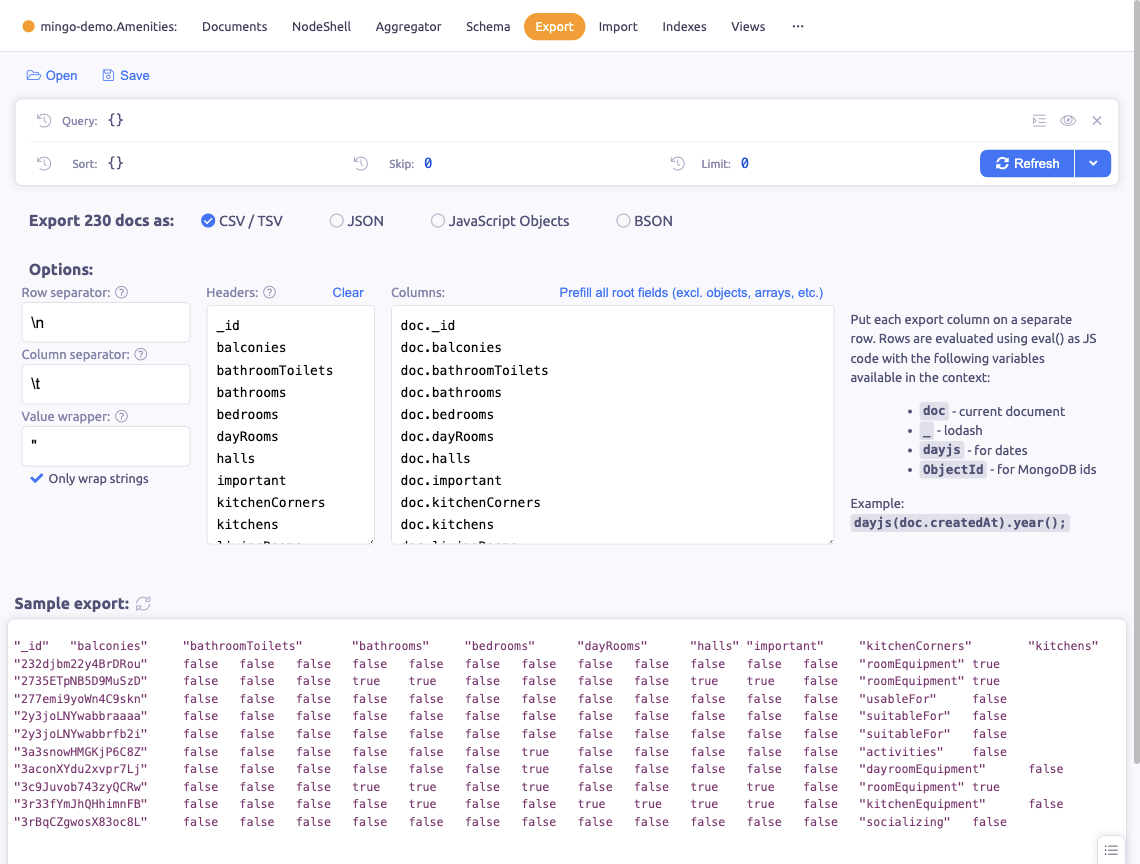
The Export section lets you export documents from a collection to various file formats.
Formats
Mingo supports exporting to:
- CSV / TSV — comma or tab-separated values, useful for spreadsheets
- JSON — standard JSON format
- JavaScript Objects — JavaScript object notation (unquoted keys)
- BSON — binary JSON, MongoDB's native format
CSV Options
When exporting to CSV/TSV, customize:
- Row separator — line ending format
- Column separator — comma, tab, semicolon, or custom
- Value wrapper — quoting style for values
- Include headers — toggle header row
Column Mapping
Define custom columns using JavaScript expressions. Each column has access to:
doc— the current document_— Lodash utility librarydayjs— date manipulation libraryObjectId— MongoDB ObjectId
This lets you transform values, combine fields, or format data during export.
Filtering
Apply filters before exporting:
- Selector — query filter to export only matching documents
- Sort — order of exported documents
- Skip / Limit — control the range of documents
Export Destinations
- File — save to a file on disk
- Clipboard — copy directly to clipboard
Saved Exports
Save export configurations per collection for reuse. This is useful when you regularly export data in the same format.
Sample Preview
Preview the first 10 documents before running the full export to verify your configuration is correct.