Aggregator
Build MongoDB aggregation pipelines visually with Mingo's drag-and-drop pipeline builder.
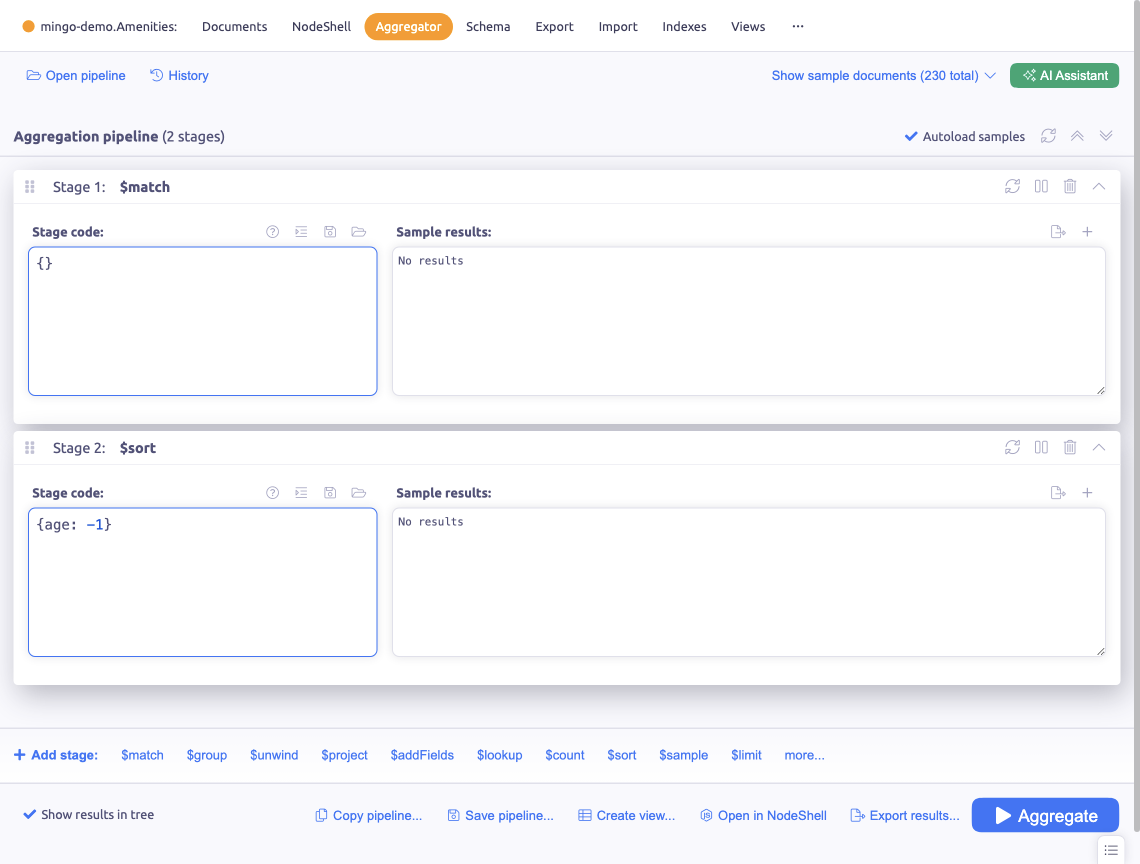
The Aggregator is a visual pipeline builder for creating MongoDB aggregation pipelines. Build complex data transformations step by step without writing raw pipeline JSON.
Building Pipelines
Adding Stages
Click Add Stage to append a new stage to your pipeline. Choose from all standard MongoDB aggregation stages including $match, $group, $project, $sort, $lookup, $unwind, $addFields, and more.
Quick-access buttons are available for the most commonly used stages, letting you add them with a single click.
Each stage shows:
- The stage type selector
- A code editor for the stage's configuration
- A preview of the stage's output
- Enable/disable toggle
Reordering Stages
Drag and drop stages to reorder them. The pipeline preview updates in real time to show the effect of the new order.
Stage Preview
Each stage shows a live preview of its output with sample documents. Toggle Autoload Samples to automatically refresh the preview when you change the pipeline.
Disabling Stages
Toggle individual stages on and off to test different pipeline configurations without deleting stages. Disabled stages are skipped during execution.
Auto-Suggestions
The Aggregator provides auto-suggestions for field names and operators based on the input documents at each stage, making it easier to build correct pipelines.
Saving and Loading Pipelines
Save pipelines for reuse with the Save button. Saved pipelines are stored per collection and can be loaded later. Access previously used pipelines through the history.
Exporting Results
Export the pipeline's output directly from the Aggregator. You can also:
- Copy pipeline — copy the raw pipeline JSON to use in your application code
- Send to NodeShell — open the pipeline in NodeShell for further scripting
Creating Views
After building a pipeline, you can create a MongoDB view from it. This turns your aggregation into a virtual collection that always shows up-to-date results.
AI Assistant
The AI panel is available in the Aggregator to help generate pipeline stages from natural language descriptions. Describe what you want to achieve and let the AI build the stages for you.
Compatibility
The available stages adapt to your MongoDB server version and type. Stages unsupported by your server are hidden or marked as unavailable. Atlas-specific stages like $search and $searchMeta appear only for Atlas connections.